Skip to content
MCPBytes
Available3D / Computer Vision

3D Model Mesh Segmentation

Turn one 3D model into parts your code and agents can use.

  • API
  • MCP
From 20 creditsMCP tool: split_3d_model
Examplesplit_3d_model

Before

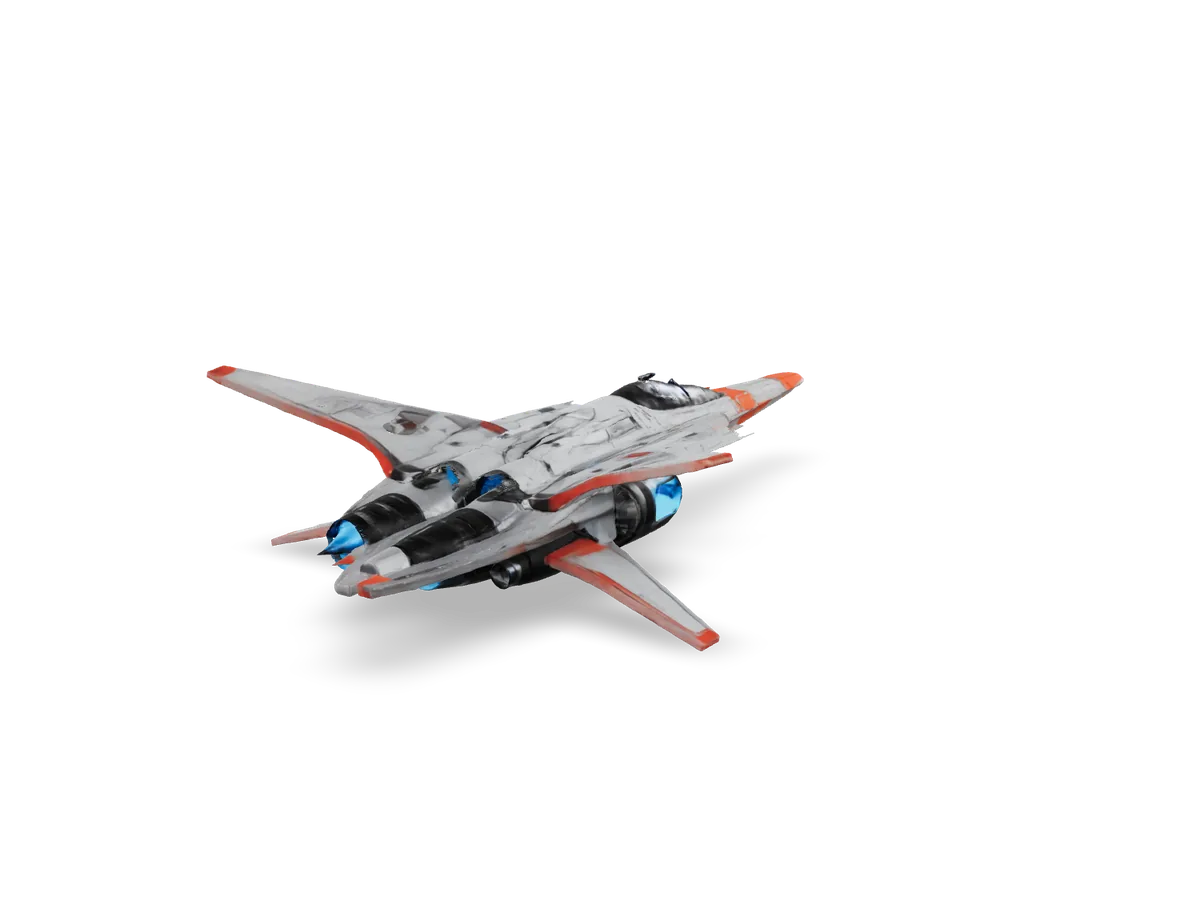
airplane.glb1 mesh

After

7 parts
  • meshes/part_000.glb
  • meshes/part_001.glb
  • meshes/part_002.glb
  • meshes/part_003.glb
  • meshes/part_004.glb
  • meshes/part_005.glb
  • meshes/part_006.glb
Example output. Parts are numbered by size; the parts returned depend on the model.

What it does

Turn one mesh into usable parts.

Send a 3D model and MCPBytes splits it into separate part meshes. Every part gets a convex collider, and manifest.json describes how the parts fit together: bounds, contacts, symmetry, and mass estimates.

Drag the slider to split the example model. Hover or select a part to isolate it.

airplane.glb1 mesh · 480 faces
Drag to rotate
After
Input formats
.glb .gltf .obj .ply .stl .off .blend
Part formats
GLB (default), OBJ or PLY
Detail
low, medium (default) or high
Outputs
Part meshes, convex colliders, segmented.glb, manifest.json, face_to_part.bin, and all of them as one .zip
Metadata
Bounds, contacts, symmetry, mass and inertia estimates

How it works

One file in, parts out.

  1. 01

    Send a model

    Send the file in the request, give a public https URL, or let your agent upload it through MCP.

  2. 02

    The job runs

    The model is split in the background. Poll the job, or let the MCP tool wait for the result.

  3. 03

    Download the parts

    Get part meshes, colliders and manifest.json from download URLs. Results are kept for 24 hours.

Pricing

Pay per job, in credits.

Costs 20 credits up to 50,000 faces, 50 credits up to 200,000 faces. The price follows the size of the input, and a job that fails costs nothing.

Pricing details

Start free

Available now

100free credits when you sign up

  • Every MCPBytes tool, one credit balance
  • Sign in with GitHub or email, no card required
  • Charged per job, by the size of the input
  • A job that fails costs nothing

Price per job

3D Mesh Segmentation

Up to 50,000 faces
20 credits
Up to 200,000 faces
50 credits

Limits

Model size
Up to 200,000 faces
At a time
1 job
Uploads
Up to 50 MB
Results
Kept for 24 hours

API

Call it from code or from an agent.

The same tool runs over the REST API and as MCP tools. One API key works for both.

Start a job

Send the file as the request body. Options such as detail go in the query string.

# The model file is the request body
curl "https://api.mcpbytes.com/v1/tools/split_3d_model/jobs?filename=airplane.glb" \
  -H "Authorization: Bearer $MCPBYTES_API_KEY" \
  --data-binary @airplane.glb
Response202 Accepted
{
  "id": "j_4f7k2m9x1q8w3e6r5t0y2u7i9o",
  "tool": "split_3d_model",
  "status": "queued",
  "input": {
    "name": "airplane.glb",
    "bytes": 2481152,
    "source": "body"
  },
  "options": {
    "detail": "medium",
    "min_part_faces": 0,
    "min_part_area": null,
    "format": "glb",
    "preprocess": "auto",
    "segmented": true,
    "density": null,
    "max_parts": 32
  },
  "error": null,
  "result": null,
  "compute_ms": null,
  "credits_charged": null,
  "created_at": "2026-09-19T12:00:00.000Z",
  "started_at": null,
  "finished_at": null,
  "outputs_expire_at": "2026-09-20T12:00:00.000Z"
}

Get the result

Poll the job until it succeeds or fails, then download the files.

Requestjob.sh
# JOB_ID is the id from the create response
curl https://api.mcpbytes.com/v1/jobs/$JOB_ID \
  -H "Authorization: Bearer $MCPBYTES_API_KEY"
Response200 OK · trimmed
{
  "id": "j_4f7k2m9x1q8w3e6r5t0y2u7i9o",
  "tool": "split_3d_model",
  "status": "succeeded",
  "result": {
    "files": [
      {
        "name": "airplane_parts.zip",
        "bytes": 1873410,
        "sha256": "",
        "url": "https://api.mcpbytes.com/blob/dl/j_4f7k2m9x1q8w3e6r5t0y2u7i9o/airplane_parts.zip?t=…"
      },
      {
        "name": "collision/part_000.glb",
        "bytes": 4212,
        "sha256": "",
        "url": "https://api.mcpbytes.com/blob/dl/j_4f7k2m9x1q8w3e6r5t0y2u7i9o/collision/part_000.glb?t=…"
      },
      {
        "name": "manifest.json",
        "bytes": 20931,
        "sha256": "",
        "url": "https://api.mcpbytes.com/blob/dl/j_4f7k2m9x1q8w3e6r5t0y2u7i9o/manifest.json?t=…"
      },
      {
        "name": "meshes/part_000.glb",
        "bytes": 512604,
        "sha256": "",
        "url": "https://api.mcpbytes.com/blob/dl/j_4f7k2m9x1q8w3e6r5t0y2u7i9o/meshes/part_000.glb?t=…"
      }
    ],
    "schema_version": 2,
    "part_count": 7,
    "input_faces": 48210,
    "exported_faces": 48210,
    "notes": [],
    "timings_s": {
      "total": 12.4
    }
  },
  "compute_ms": 14210,
  "credits_charged": 20,
  "finished_at": "2026-09-19T12:00:16.000Z",
  "outputs_expire_at": "2026-09-20T12:00:00.000Z"
}
MCP

Connect once. Your agent calls split_3d_model and gets the download URLs back. This endpoint has only this tool's family, which keeps your agent's tool list short; one endpoint has every tool.

Claude Code

The first form signs in through the browser when you run /mcp. In .mcp.json (project root), ${MCPBYTES_API_KEY} is read from the environment when Claude Code connects. Claude Code docs

claude mcp add --transport http mcpbytes \
  https://api.mcpbytes.com/mcp/3d
Codex (CLI, IDE extension, ChatGPT desktop)

Codex reads the key from the environment variable each time it connects. The same table can go in ~/.codex/config.toml by hand; codex mcp add has no --header flag. Codex docs

codex mcp add mcpbytes --url https://api.mcpbytes.com/mcp/3d \
  --bearer-token-env-var MCPBYTES_API_KEY
Cursor

~/.cursor/mcp.json (all projects) or .cursor/mcp.json (one project). Remote servers take no "type". Without the header, the client signs you in with GitHub or an email link (OAuth). Cursor docs

~/.cursor/mcp.json
{
  "mcpServers": {
    "mcpbytes": {
      "url": "https://api.mcpbytes.com/mcp/3d",
      "headers": {
        "Authorization": "Bearer ${env:MCPBYTES_API_KEY}"
      }
    }
  }
}
VS Code (GitHub Copilot)

.vscode/mcp.json, or "MCP: Open User Configuration". The top-level key is "servers". VS Code asks for the key once and stores it securely. Without the header, the client signs you in with GitHub or an email link (OAuth). VS Code docs

.vscode/mcp.json
{
  "inputs": [
    {
      "type": "promptString",
      "id": "mcpbytes-api-key",
      "description": "MCPBytes API key (mcpb_...)",
      "password": true
    }
  ],
  "servers": {
    "mcpbytes": {
      "type": "http",
      "url": "https://api.mcpbytes.com/mcp/3d",
      "headers": {
        "Authorization": "Bearer ${input:mcpbytes-api-key}"
      }
    }
  }
}
Gemini CLI

~/.gemini/settings.json or .gemini/settings.json. The key is "httpUrl" ("url" means the older SSE transport). Without the header, the client signs you in with GitHub or an email link (OAuth). Then sign in with /mcp auth. Gemini CLI docs

~/.gemini/settings.json
{
  "mcpServers": {
    "mcpbytes": {
      "httpUrl": "https://api.mcpbytes.com/mcp/3d",
      "headers": {
        "Authorization": "Bearer ${MCPBYTES_API_KEY}"
      }
    }
  }
}
OpenCode

opencode.json or ~/.config/opencode/opencode.json. Variables are written {env:NAME}. "oauth": false makes a wrong key an error instead of a sign-in; remove it and the headers to sign in with OAuth. OpenCode docs

opencode.json
{
  "$schema": "https://opencode.ai/config.json",
  "mcp": {
    "mcpbytes": {
      "type": "remote",
      "url": "https://api.mcpbytes.com/mcp/3d",
      "enabled": true,
      "oauth": false,
      "headers": {
        "Authorization": "Bearer {env:MCPBYTES_API_KEY}"
      }
    }
  }
}
oh-my-pi (omp)

.omp/mcp.json (project) or ~/.omp/agent/mcp.json (user). Without the header, the client signs you in with GitHub or an email link (OAuth). Then run /mcp reauth mcpbytes in a session. omp also picks up servers already set up for Claude Code, Cursor, VS Code, Gemini CLI and Codex. oh-my-pi docs

.omp/mcp.json
{
  "mcpServers": {
    "mcpbytes": {
      "type": "http",
      "url": "https://api.mcpbytes.com/mcp/3d",
      "headers": {
        "Authorization": "Bearer ${MCPBYTES_API_KEY}"
      }
    }
  }
}
pi

pi has no MCP support, by design: its author recommends command-line tools described by a skill. Install the MCPBytes skill (it drives the REST API with a small script), or add MCP with the pi-mcp-adapter extension. pi docs

mkdir -p ~/.pi/agent/skills/mcpbytes
curl -fsSL https://mcpbytes.com/skills/mcpbytes/mcpbytes.tar.gz \
  | tar -xz -C ~/.pi/agent/skills/mcpbytes
DeepSeek

DeepSeek's API does not run MCP servers itself: the agent you use DeepSeek models in does (Claude Code, OpenCode, oh-my-pi, Cline: use that agent's entry here). DeepSeek's own agent, DeepSeek Harness (dsh, a developer preview), takes this patch in ~/.dsh/cordis.patch.yml; it supports headers, not OAuth. DeepSeek docs

~/.dsh/cordis.patch.yml
- insert:
    - id: mcp-mcpbytes
      name: '@deepseek-ai/dsh-mcp-client'
      config:
        serverName: mcpbytes
        transport: streamable-http
        url: https://api.mcpbytes.com/mcp/3d
        headers:
          Authorization: !!js '`Bearer ${process.env.MCPBYTES_API_KEY}`'
Windsurf

~/.codeium/windsurf/mcp_config.json. Without the header, the client signs you in with GitHub or an email link (OAuth). Cascade allows 100 tools in total, so a single-family endpoint helps. Windsurf docs

~/.codeium/windsurf/mcp_config.json
{
  "mcpServers": {
    "mcpbytes": {
      "serverUrl": "https://api.mcpbytes.com/mcp/3d",
      "headers": {
        "Authorization": "Bearer ${env:MCPBYTES_API_KEY}"
      }
    }
  }
}
Goose

~/.config/goose/config.yaml (Windows: %APPDATA%\Block\goose\config\config.yaml), or "goose configure" > Add Extension > Remote Extension (Streamable HTTP). The key is "uri". Without the header, the client signs you in with GitHub or an email link (OAuth). Goose docs

~/.config/goose/config.yaml
extensions:
  mcpbytes:
    type: streamable_http
    name: mcpbytes
    enabled: true
    uri: "https://api.mcpbytes.com/mcp/3d"
    headers:
      Authorization: "Bearer ${MCPBYTES_API_KEY}"
    env_keys:
      - MCPBYTES_API_KEY
    timeout: 300
Zed

settings.json, or Settings > AI > MCP Servers > Add Server > Add Remote Server. Zed's settings cannot read environment variables, so sign in instead of storing a key: with no Authorization header, Zed starts the OAuth sign-in. Zed docs

settings.json
{
  "context_servers": {
    "mcpbytes": {
      "url": "https://api.mcpbytes.com/mcp/3d"
    }
  }
}
Claude (desktop and web) and ChatGPT

These add remote servers as connectors and sign in with OAuth; there is no field for an API key. Claude: Customize > Connectors > Add custom connector. ChatGPT: turn on Developer mode in Settings, then create an app. Enter this URL: Claude docs

Connector URL
https://api.mcpbytes.com/mcp/3d
Any client that only starts local (stdio) servers

mcp-remote runs locally and forwards to the endpoint. The header is written without a space and takes its value from "env", because some clients on Windows break arguments that contain spaces. Use it for Cline too. Without the --header arguments and "env", mcp-remote signs you in with OAuth. Any client that only starts local docs

mcp-remote
{
  "mcpServers": {
    "mcpbytes": {
      "command": "npx",
      "args": [
        "-y",
        "mcp-remote",
        "https://api.mcpbytes.com/mcp/3d",
        "--transport",
        "http-only",
        "--header",
        "Authorization:${MCPBYTES_AUTH}"
      ],
      "env": {
        "MCPBYTES_AUTH": "Bearer <your key>"
      }
    }
  }
}
MCP tools
split_3d_model
Starts a job that splits a 3D model into separate part meshes, each with a convex collider, plus manifest.json (bounds, contacts, symmetry, mass estimates). Give upload_id (from create_upload) or a public https url. Waits up to wait_seconds for the result. Costs 20 credits up to 50,000 faces, 50 credits up to 200,000 faces.
create_upload
Returns a one-hour URL to PUT a local file to; then call the tool with the upload_id.
get_job
Status and results of a job; waits up to wait_seconds for it to finish.
list_jobs
Your most recent jobs, newest first.
read_job_file
Reads a text output (.txt .json .md .csv) of a succeeded job in chunks.

Use cases

Where it fits.

  • Game asset pipelines

    Split models into parts for damage states, detachable pieces, or swappable components.

  • 3D editing workflows

    Select and edit one component instead of separating geometry by hand.

  • Robotics & simulation

    Give each part its own collider, mass and inertia estimate in a physics scene.

  • AI-generated 3D cleanup

    Generated meshes often arrive as one piece. Separate them into usable parts.

  • Asset preprocessing

    Prepare assets for downstream steps that expect separated components.

  • Procedural workflows

    Feed individual parts into procedural tools and variation pipelines.

  • Agent-driven 3D manipulation

    Let an agent split a model, then operate on exactly the part it needs.

  • Have a different workflow in mind?

    Read the docs

From API key to first call in minutes.

Sign in with GitHub, create a key, and point your agent or code at MCPBytes. Your first 100 credits are free.

# Sign in with GitHub when prompted
claude mcp add --transport http mcpbytes \
  https://api.mcpbytes.com/mcp

# Or use an API key
claude mcp add --transport http mcpbytes \
  https://api.mcpbytes.com/mcp \
  --header "Authorization: Bearer $MCPBYTES_API_KEY"